
What is viewneo?
viewneo is a digital signage system that combines hardware and software to display digital content — such as images, videos, or interactive templates — on any monitor, TV, or display. A web-based content management system (CMS) lets you control what plays on your screens, while a media player device handles the actual playback.
You can manage everything from a single screen to thousands of displays centrally via the internet.
How It Works
Section titled “How It Works”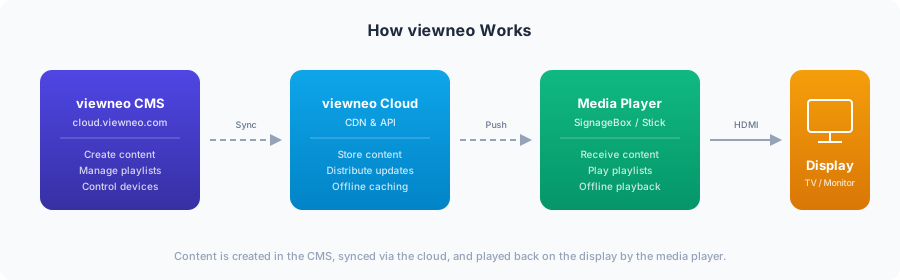
The system consists of three components:
- CMS (Content Management System) — A web-based platform where you upload media, create playlists, design content, and manage your screens.
- Media Player — A small hardware device (or software player) connected to each display that downloads and plays your content.
- Display — Any TV screen, monitor, LED wall, video wall, or tablet PC.
Use Cases
Section titled “Use Cases”Digital signage with viewneo can be used for a wide range of applications:
- Advertising — Out-of-home advertising, in-store promotions, digital menu boards
- Information displays — News, announcements, and real-time updates
- Visitor guidance — Wayfinding in museums, hotels, hospitals, and public buildings
- Employee communication — Internal updates in offices, canteens, and reception areas
- Entertainment — Content for waiting areas and lobbies
Minimum Requirements
Section titled “Minimum Requirements”To get started with viewneo, you need three things:
| Component | Description |
|---|---|
| User Account | A free account at viewneo.com to access the CMS |
| Media Player | A viewneo player device with internet access (WiFi or LAN), or a tablet (Android/iOS) |
| Display | Any TV, monitor, video wall, or video projector |