
What is an RFID hub?
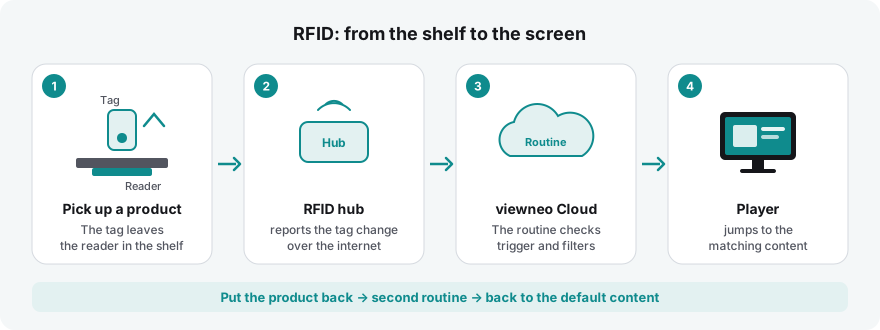
With an RFID hub, your screens react to objects. If someone takes a product off the shelf, the screen next to it shows exactly this product. If someone places a card on a station, the matching video starts. Nobody has to touch a screen for this.
The three building blocks
Section titled “The three building blocks”| Building block | What it does |
|---|---|
| Tag | A small sticker or chip on the object – on the product, on a card, on an exhibit. Every tag has a fixed number, the tag ID. |
| Reader | Sits under the shelf surface or in a station and detects which tag is currently placed on it. A reader always detects exactly one tag. |
| RFID hub | Connects one or more readers by cable and sends every change to viewneo over the internet – via network cable or Wi-Fi. |
In the CMS, you find everything under IoT devices › RFID hubs: your hubs, their readers and the learned tags.
What happens then
Section titled “What happens then”The hub only reports what has changed: a tag was placed or lifted. What the screen shows in response is defined by a routine – trigger RFID tag, plus filters such as “Tag Sanddorn-Massageöl lifted” and the action Switch content on the player next to it. The details are described under RFID in routines.
Because the path runs through the viewneo Cloud, hub and player do not have to be in the same network. Both only need an internet connection.
What it is suited for
Section titled “What it is suited for”- Lift & learn in retail – A customer takes a product off the shelf, the screen shows details, price or a video. When they put it back, the general programme runs again.
- Museums and exhibitions – Visitors place an object or a card on a station, the screen tells the matching story.
- Trade fair stands and showrooms – Every exhibit has its own film. Whoever picks up a sample immediately sees the details.
- Quizzes and learning stations – The right card on the right field shows “Correct!”, any other shows “Try again”.
- Hotels and hospitality – A spa shelf with care products to take away, a wine wall in the bar: the product that was picked up appears large on the screen at the reception.
You find recipes for these cases under RFID in routines.
What you need
Section titled “What you need”- An RFID hub with at least one reader and suitable tags. You get the hardware from your viewneo contact.
- For the hub: power and internet – via network cable or Wi-Fi.
- One or more players on which the content should appear. Each of these players must have the Routines plugin assigned (What you need). The hub itself does not need a licence.
- In the CMS, the permission to manage devices.
Next steps
Section titled “Next steps”- Connect an RFID hub – create the hub in the CMS and set it up with the activation code.
- Readers – name the readers so you recognise them in routines.
- Learn tags – place tags once and give them names.
- RFID in routines – define what happens when a tag is placed or lifted.