
Readers
A reader detects which tag is currently placed on it. It sits under a shelf surface, in a base or in a station and is connected to the RFID hub by cable.
Readers appear by themselves
Section titled “Readers appear by themselves”You don’t have to create readers. As soon as the hub is connected, it reports its readers, and they appear in the middle column of the IoT devices › RFID hubs page – initially with names like “Reader 11”. The hub reports them on start-up and again when a reader is added or removed.
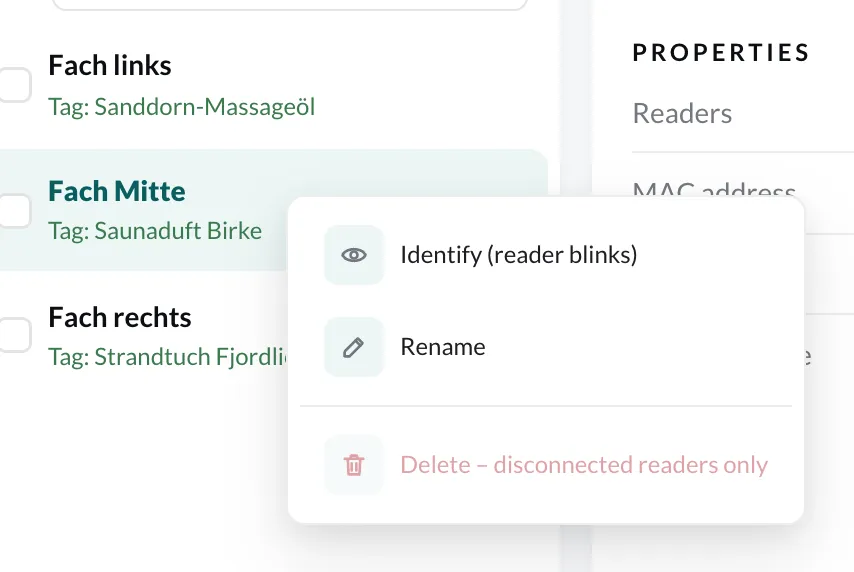
Each row shows the name and the current state:
| Display | Meaning |
|---|---|
| No tag placed | The reader is connected and empty. |
| Tag: Saunaduft Birke | A learned tag is placed on the reader. |
| 2041736121 · unknown | A tag is placed but not learned yet. Clicking the row opens learning. |
| Disconnected | The hub is currently not reporting this reader – for example because the cable has come loose. |
The display updates by itself every few seconds. So while setting up, you can check right away whether a reader detects a tag.
Name readers
Section titled “Name readers”Give each reader a name that says where it sits – “Fach links”, “Station 3”, “Entrance showcase”. You will see these names later in the RFID reader routine filter and in the log.
- Right-click the reader.
- Choose Rename, enter the name and click Save.
Which reader is which?
Section titled “Which reader is which?”If several identical readers are attached to one hub, Identify (reader blinks) in the context menu helps: the selected reader blinks, and you immediately see which one it is. Alternatively, place a tag on a reader and watch in which row it appears.
Remove a reader
Section titled “Remove a reader”You delete a reader that you have permanently removed via right-click › Delete. This only works for disconnected readers – a connected reader would be reported again by the hub immediately. If you later connect a deleted reader again, it reappears.
Mounting tips
Section titled “Mounting tips”- A reader detects one tag at a time. For every spot where a separate object sits, you need a separate reader.
- The tag must be close to the reader – a few centimetres. Mount the reader directly under the spot where the object stands, and mark the spot clearly.
- Metal between tag and reader disrupts detection. Wood, glass and plastic are no problem.
- After mounting, check every spot: place the object, and Tag: … must appear in the readers column.