Reset
Reset (Soft Reset)
Section titled “Reset (Soft Reset)”A soft reset restarts the viewneo Player App without deleting stored content or settings.
- Open the Settings
- Select Reset
- Confirm the action
Factory Reset (Hard Reset via the Menu)
Section titled “Factory Reset (Hard Reset via the Menu)”A hard reset via the settings menu restores the SignageBox to factory settings. All stored content and configurations are deleted.
- Open the Settings
- Select Factory Reset
- Confirm the action
Factory Reset (Hard Reset with a Paperclip)
Section titled “Factory Reset (Hard Reset with a Paperclip)”If the SignageBox no longer starts correctly or does not respond, you can perform a hard reset using the physical reset button.
- Disconnect the power cable from the device
- Connect a USB keyboard and the HDMI cable
- The reset button is located inside the AV input of the device. Insert the paperclip or SIM card ejector tool and hold the button down
- Keep holding the button while you connect the power cable at the same time. Hold the button until the message boot appears on the display
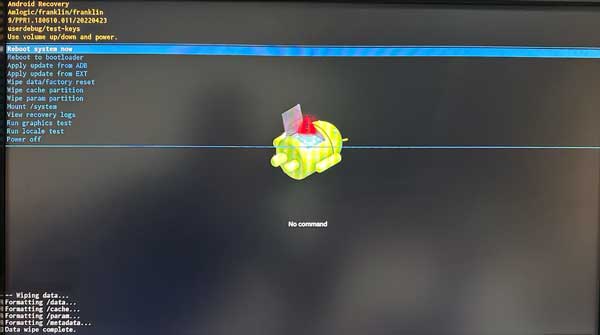
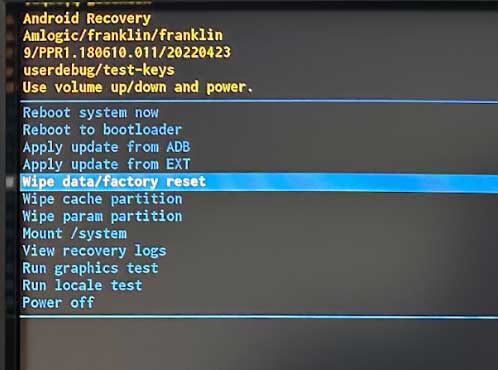
- The recovery menu appears on the screen. Select Wipe data/factory reset
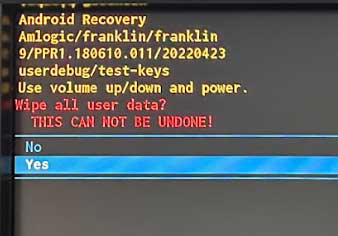
- Confirm with Yes
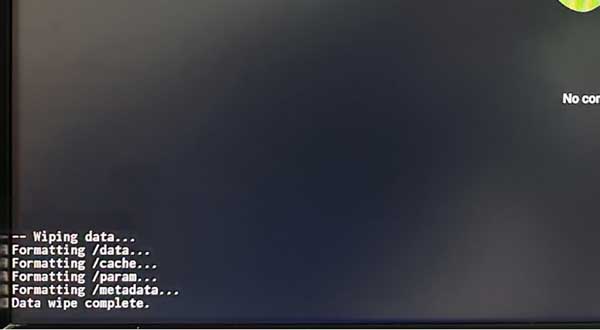
- When finished, the message Data wipe complete appears
- Select Reboot system now — the device restarts and is reset