Reset
Reset (Soft Reset)
Section titled “Reset (Soft Reset)”A soft reset restarts the viewneo Player App without deleting stored content or settings.
- Open the Settings
- Select Reset
- Confirm the process
Factory Reset (Hard Reset via Menu)
Section titled “Factory Reset (Hard Reset via Menu)”A hard reset via the settings menu restores the SignageBox to factory settings. All stored content and configurations are deleted.
- Open the Settings
- Select Factory Reset
- Confirm the process
Factory Reset (Hard Reset with Paperclip)
Section titled “Factory Reset (Hard Reset with Paperclip)”If the SignageBox no longer starts correctly or becomes unresponsive, a hard reset can be performed using the physical reset button.
- Disconnect the power cable from the device
- Connect a USB keyboard and the HDMI cable
- The reset button is located inside the AV input of the device. Insert the paperclip or SIM card ejector tool and hold the button down
- Continue holding the button while simultaneously connecting the power cable. Keep holding the button until the message boot appears on the display
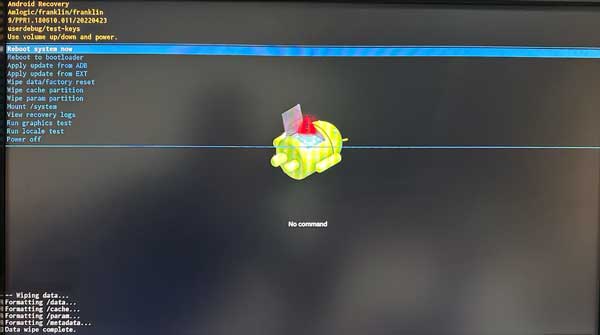
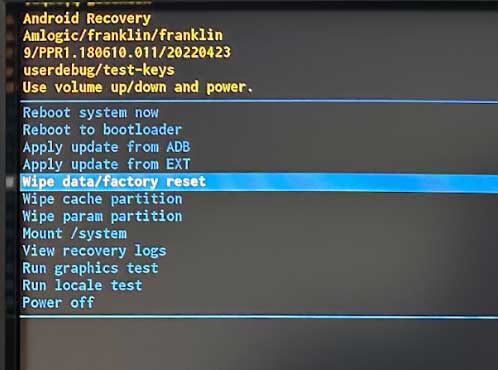
- The recovery menu appears on the screen. Select Wipe data/factory reset
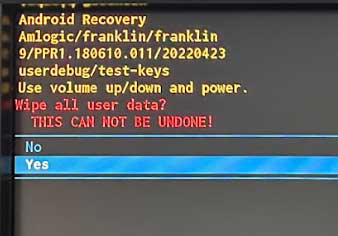
- Confirm with Yes
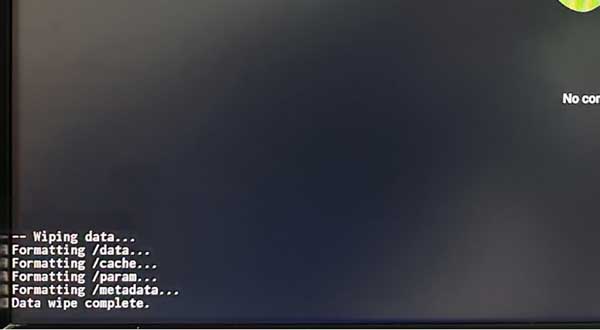
- After completion, the message Data wipe complete appears
- Select Reboot system now — the device restarts and is reset