
IoT & Sensors Overview
viewneo integrates with IoT devices and sensors to create interactive, context-aware digital signage experiences. Sensors can detect physical events (motion, proximity, button presses) and trigger content changes on your screens automatically.
Available IoT Systems
Section titled “Available IoT Systems”viewneo Butler (Zigbee Gateway)
Section titled “viewneo Butler (Zigbee Gateway)”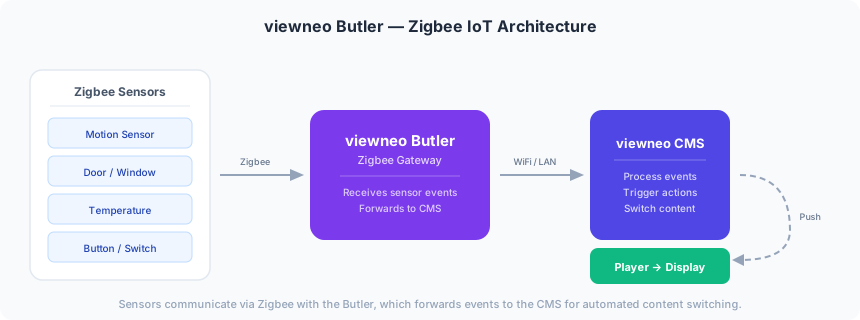
The Butler is a Zigbee gateway that connects wireless sensors and IoT devices to viewneo. It acts as a bridge between Zigbee-compatible sensors and the viewneo CMS.
With Butler, you can:
- Connect Zigbee sensors (motion, door/window, temperature, buttons)
- Trigger playlist or content changes based on sensor events
- Create interactive retail and exhibition experiences
Getting started:
RFID Hub
Section titled “RFID Hub”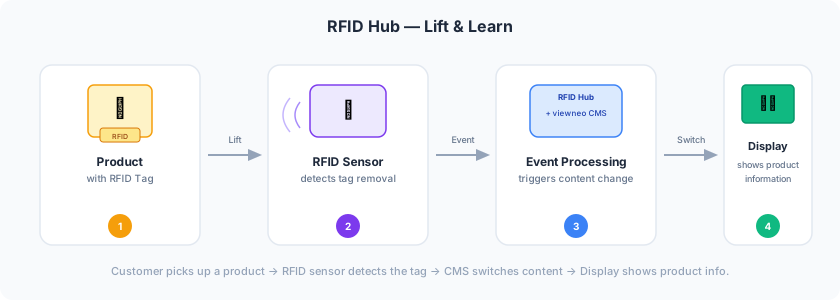
The RFID Hub enables “lift and learn” experiences in retail environments. When a customer picks up a product with an RFID tag, the screen automatically displays relevant product information.
With RFID Hub, you can:
- Detect when tagged products are picked up or put down
- Trigger content changes based on RFID tag events
- Create bulk event rules for many products at once
Getting started:
How It Works
Section titled “How It Works”IoT devices connect to viewneo through the Events system. The general workflow is:
- Hardware — Install and activate the IoT device (Butler or RFID Hub)
- Sensors — Pair and configure sensors or RFID tags
- Events — Create event rules with triggers, filters, and actions
- Content — When a sensor event occurs, the player automatically switches content