
Multiple Playlists on a Player (time-controlled)
Each device in viewneo is assigned a single playlist. To display different content at different times, you can use nested playlists with time-based scheduling.
How It Works
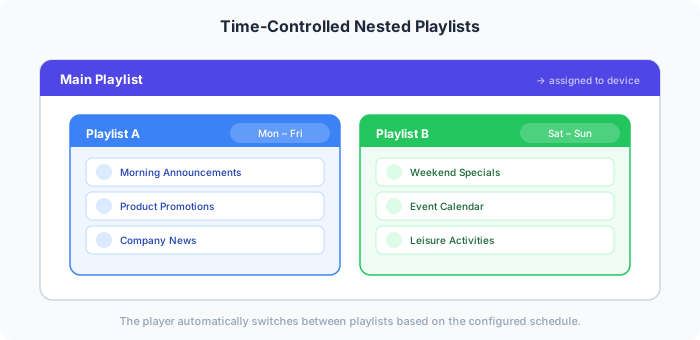
Section titled “How It Works”Create a Main Playlist that contains other playlists as nested items. Each nested playlist gets its own schedule (dates, times, weekdays). The Main Playlist acts as a container — the player switches between nested playlists automatically based on the configured schedule.
Step-by-Step Example
Section titled “Step-by-Step Example”Scenario: A player should show “Playlist A” on weekdays and “Playlist B” on weekends.
Step 1: Create the Playlists
Section titled “Step 1: Create the Playlists”Create three playlists:
- Main Playlist — The container playlist assigned to the device
- Playlist A — Contains weekday content
- Playlist B — Contains weekend content
Fill Playlist A and Playlist B with their respective content.
Step 2: Nest the Playlists
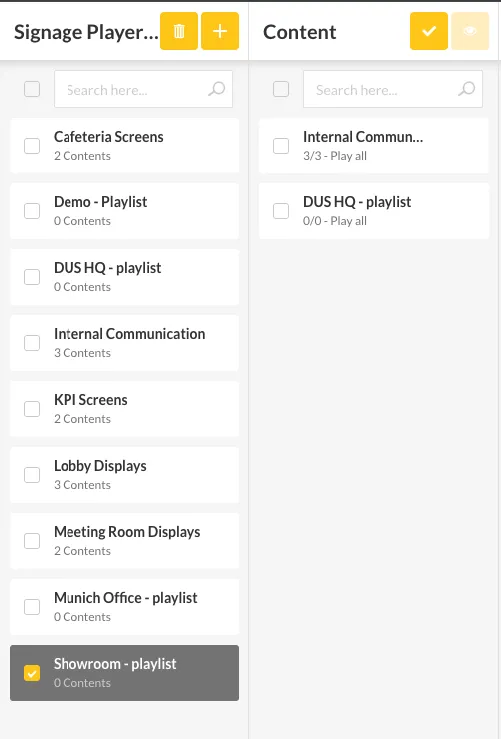
Section titled “Step 2: Nest the Playlists”Edit the Main Playlist and drag both Playlist A and Playlist B into it.
Step 3: Assign to a Device
Section titled “Step 3: Assign to a Device”Link the device or device group to the Main Playlist only.
Step 4: Set Schedules
Section titled “Step 4: Set Schedules”- In the Main Playlist, click on Playlist A
- Open the Schedule tab
- Select Monday through Friday
- Repeat for Playlist B and select Saturday and Sunday
Result
Section titled “Result”The player automatically switches between the two playlists based on the day of the week — no manual intervention needed.